
SELECT MAX(Salary)
FROM Employee
WHERE Salary NOT IN (select MAX(Salary) from Employee );
See How to find the second highest salary in SQL for more ways to solve this problem.
SELECT DeptID, MAX(Salary)
FROM Employee
GROUP BY DeptID.
These questions become more interesting if the Interviewer will ask you to print the department name instead of the department id, in that case, you need to join the Employee table with Department using the foreign key DeptID, make sure you do LEFT or RIGHT OUTER JOIN to include departments without any employee as well.
SELECT DeptName, MAX(Salary)
FROM Employee e RIGHT JOIN Department d
ON e.DeptId = d.DeptID
GROUP BY DeptName;
SELECT GetDate();
Question 4: Write an SQL Query to check whether the date passed to Query is the date of the given format or not?
SELECT ISDATE('1/08/13') AS "MM/DD/YY";
It will return 0 because the passed date is not in the correct format.
SELECT DISTINCT EmpName
FROM Employees
WHERE DOB BETWEEN ‘01/01/1960’ AND ‘31/12/1975’;
SELECT COUNT(*), sex
FROM Employees
WHERE DOB BETWEEN '01/01/1960' AND '31/12/1975'
GROUP BY sex;
Question 7: Write an SQL Query to find an employee whose salary is equal to or greater than 10000.
SELECT EmpName FROM Employees WHERE Salary>=10000;
SELECT * FROM Employees WHERE EmpName like 'M%';
SELECT * from Employees WHERE UPPER(EmpName) like '%JOE%';
SELECT YEAR(GETDATE()) as "Year";
Question 11: Write SQL Query to find duplicate rows in a database? and then write SQL query to delete them?
Answer: You can use the following query to select distinct records:
SELECT * FROM emp a
WHERE rowid = (SELECT MAX(rowid)
FROM EMP b
WHERE a.empno=b.empno)
to Delete:
DELETE FROM emp a
WHERE rowid != (SELECT MAX(rowid) FROM emp b WHERE a.empno=b.empno);
Variant #2:
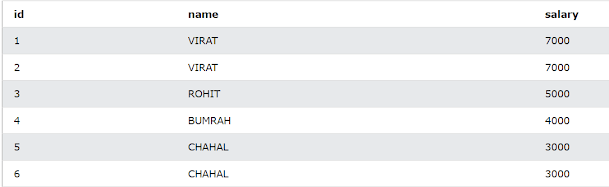
To compute the maximum id of each data row, we utilize the SQL MAX function.
SELECT *

    FROM Employee

    WHERE id NOT IN
    (

        SELECT MAX(id)

        FROM Employee

        GROUP BY name, salary
    );
The result of the above query is something like below :

We can see that the Select line above leaves out the maximum ID value for each duplicate row, leaving only the minimum ID value.
Replace the first Select with the SQL delete statement as shown in the following query to eliminate this data.
DELETE

    FROM Employee

    WHERE id NOT IN
    (

        SELECT MAX(id)

        FROM Employee

        GROUP BY name, salary
    );
Perform a select on an Employee table after executing the delete statement, and you'll obtain the following entries that don't have any duplicate rows.
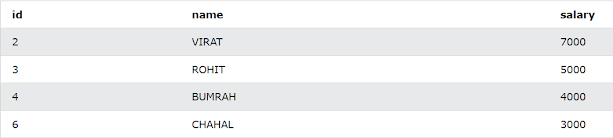
(from here)
Question 12: There is a table which contains two columns Student and Marks, you need to find all the students, whose marks are greater than average marks i.e. list of above-average students.Answer: This query can be written using subquery as shown below:
SELECT student, marks
FROM table
WHERE marks > (SELECT AVG(marks) from table)
Question 13: How do you find all employees who are also managers?
You have given a standard employee table with an additional column mgr_id, which contains the employee id of the manager.

Answer: You need to know about self-join to solve this problem. In Self Join, you can join two instances of the same table to find out additional details as shown below
SELECT e.name, m.name
FROM Employee e, Employee m
WHERE e.mgr_id = m.emp_id;
this will show employee name and manager name in two columns like
name manager_name
John David
One follow-up is to modify this query to include employees which don't have a manager. To solve that, instead of using the inner join, just use the left outer join, this will also include employees without managers.
Here is the SQL query to find Employees earning more than their managers:
+----+-------+--------+-----------+
| Id | Name | Salary | ManagerId |
+----+-------+--------+-----------+
| 1 | Joe | 70000 | 3 |
| 2 | Henry | 80000 | 4 |
| 3 | Sam | 60000 | NULL |
| 4 | Max | 90000 | NULL |
+----+-------+--------+-----------+
SELECT e1.name FROM Employee e1
JOIN Employee e2 ON e1.ManagerId = e2.Id
WHERE e1.salary > e2.salary
SELECT * FROM Employee WHERE EmpId=2 and EmpFirstName='Radhe'If the given two columns are secondary index columns then the index will not invoke, but if the given 2 columns contain the primary index(first column while creating index) then the index will invoke. In this case, the Index will be used because EmpId and EmpFirstName are primary columns.
+Questions: SQL query to find duplicate values in a Column
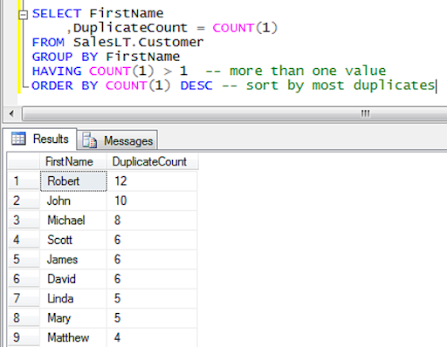
1. Finding Duplicate elements By using GROUP BY
The simplest solution to this problem is by using the GROUP BY and HAVING Clause. Use GROUP BY to group the result set on email, this will bring all duplicate emails in one group, now if the count for a particular email is greater than 1 it means it is a duplicate email.SELECT Email FROM Person GROUP BY Email HAVING COUNT(Email) > 1This is also my accepted answer on LeetCode. You can see by using the count function you can count a number of elements in the group and if your group contains more than 1 row then it's a duplicate value that you want to print.
2. Finding Duplicate values in a column By using Self Join
By the way, there are a couple of more ways to solve this problem, one is by using Self Join. If you remember, In Self Join we join two instances of the same table to compare one record to another.SELECT DISTINCT a.Email FROM Person a JOIN Person b ON a.Email = b. Email WHERE a.Id != b.Id
Remember to use the keyword distinct here because it will print the duplicate email as many times it appears in the table. This is also an accepted solution in Leetcode.
3. Finding duplicate emails By using Sub-query with EXISTS:
You can even solve this problem using a correlated subquery. In a correlated subquery, the inner query is executed for each record in the outer query. So one email is compared to the rest of the email in the same table using a correlated subquery and EXISTS clause in SQL as shown below.SELECT DISTINCT p1.Email FROM Person p1 WHERE EXISTS( SELECT * FROM Person p2 WHERE p2.Email = p1.Email AND p2.Id != p1.Id )
+Questions: How to Find Customers Who Never Order using EXISTS in SQL
| Table: Customers. | Table: Orders. | RESULT |
| +----+-------+ | Id | Name | +----+-------+ | 1 | Joe | | 2 | Henry | | 3 | Sam | | 4 | Max | +----+-------+ | +----+------------+ | Id | CustomerId | +----+------------+ | 1 | 3 | | 2 | 1 | +----+------------+ | +-----------+ | Customers | +-----------+ | Henry | | Max | +-----------+ |
SELECT C.Name FROM Customers C
LEFT JOIN Orders O ON  C.Id = O.CustomerId
WHERE O.CustomerId is NULL
When you join two tables in SQL using a LEFT OUTER JOIN, then a big table will be created with NULL values in the column which don't exist in another table.
For example, the big table will have four columns C.Id, C.Name, O.Id, and O.CustomerId, for Customers who have never ordered anything, the O.CustomerId will be NULL.
Many programmers make the mistake of using != in the JOIN condition to solve this problem, with the assumption that if = returns matching rows, then != will return those ids which are not present in another table. So beware of that.
SELECT C.Name FROM Customers C
WHERE NOT EXISTS (SELECT 1 FROM Orders O WHERE C.Id = O.CustomerId)
This is a correlated subquery, where the inner query will execute for each row of the outer query, and only those customers will be returned who have not ordered anything.
Btw, the most simple solution is by using the NOT IN Clause.
SELECT A.Name FROM Customers A
WHERE A.Id NOT IN (SELECT B.CustomerId FROMs Orders B)



Leave a Comment